Smart Restaurant Voice Order & Billing System
An automated voice-driven dining system featuring interactive English speech commands, real-time SQL order management, kitchen status syncing, and automated error handling.
1. Introduction & System Overview
Smart Dining Voice System is a modern, full-stack voice-driven restaurant automation platform designed to eliminate manual ordering hassles. Built with Next.js, MySQL, and Web Speech API, it enables hands-free voice interaction for customers while seamlessly syncing live orders with kitchen staff and restaurant management in real-time.
🍕 For Customers
- Listen to automated system welcome speech & live menu announcements.
- Place orders easily using English voice commands (e.g., 'I want 2 burgers').
- Hear order summaries & total bill calculations before final confirmation.
- Get real-time voice & screen notifications when food is ready to collect.
👨🍳 For Chef & Kitchen Staff
- View incoming voice orders instantly on the real-time Kitchen Dashboard.
- Track order details, item quantities, and live table numbers seamlessly.
- Update order progress status (Pending → Cooking → Ready) with one click.
⚙️ For Restaurant Admin
- Manage restaurant menu items, pricing, categories, and item availability.
- Upload food images and update database entries dynamically using Prisma.
- Monitor sales analytics, daily revenue, and overall order history.
Core Objective
Build a real-time, voice-assisted Relational Database System (MySQL + Prisma) in Next.js that automates English speech recognition, parses user intents for exact order processing, provides automatic error handling for unrecognized speech, and instantly synchronizes order states across customers and kitchen dashboards.
2. System Architecture & Data Flow
Smart Dining Voice System is built on a unified, full-stack client-server architecture powered by Next.js. The frontend utilizes browser-native speech recognition and synthesis APIs for real-time voice interactions, while the Next.js Server Actions execute business logic, NLP intent parsing, fallback error handling, and Prisma-backed database transactions on a normalized 3NF MySQL database.
🏗️ System Layers Breakdown
Next.js (React) + Web Speech API
Manages interactive customer ordering UIs and real-time kitchen dashboards using Web Speech Recognition (STT) for voice input and SpeechSynthesis (TTS) for English voice feedback.
Next.js Server Actions & API Routes
Processes transcribed text, extracts ordered items and quantities via Regex/Intent Matching, handles speech validation fallbacks, and triggers real-time SSE notifications for chefs.
MySQL (3NF) + Prisma ORM
Stores fully normalized relational records for menu items, order status tracking, item pricing, and detailed customer order history with strict foreign key constraints.
🔄 Step-by-Step Voice Order Data Flow
- Voice Capture & Speech-to-Text: The system speaks a welcome message using SpeechSynthesis. When the customer replies (e.g., "I want 2 chicken burgers and 1 coke"), the Web Speech API captures the audio stream and transcribes it into an English text string.
- Intent Matching & Parsing: The transcribed text string is sent to a Next.js Server Action. The backend parses quantities, matches requested item names against active database records, and calculates total price subtotals.
- Fallback Logic (Unrecognized Audio): If speech is muted, ambiguous, or the requested food item is absent from the database, the server returns an error response, triggering the system voice prompt:
"Please say again, I do not understand." - Customer Order Confirmation: Upon successful match, the system speaks back an itemized summary and total bill, asking for final confirmation. Once the user says "Yes" or "Confirm", the transaction commits to the MySQL database.
- Real-time Kitchen Sync & Completion: A Server-Sent Event (SSE) or Pusher event broadcasts the new pending order instantly to the Kitchen Dashboard. Once the chef marks the food as cooked, a completion signal updates MySQL and plays a voice alert on the customer screen:
"Your order is ready. Thank you!"
3. Database Schema & 3NF Normalization
To ensure high transactional integrity, handle real-time voice ordering, and eliminate data redundancy, the Smart Restaurant database schema is strictly normalized up to Third Normal Form (3NF). This guarantees fast query execution and prevents insertion, update, or deletion anomalies during peak operating hours.
🗄️ Relational Tables Overview
1. users
Stores authentication credentials, contact details, and role flags (ADMIN, CHEF, CUSTOMER) to enforce Role-Based Access Control (RBAC).
2. categories
Organizes food items into logical groupings (e.g., Main Course, Beverages, Desserts) for streamlined voice search and UI filtering.
3. menu_items
Holds complete food item details including name, price, description, high-res image URL, availability status, and foreign key link to category.
4. orders
Acts as the main transaction header tracking table number, live kitchen status (PENDING, COOKING, READY, COMPLETED), subtotal, tax, and final total.
5. order_details
Junction table capturing itemized line items per order, quantity ordered, historical unit price snapshot, and computed total item price.
6. payments
Records hybrid payment histories supporting CASH, MOBILE_BANKING, and ONLINE_CARD with gateway transaction IDs.
7. voice_logs
Stores Speech-to-Text (STT) transcripts, intent extraction status, and mapping to orders for AI model accuracy auditing and troubleshooting.
📊 Database Schema Constraints (SQL Field Level)
- id (INT, PK, Auto Increment)
- name (VARCHAR 100, NOT NULL)
- email (VARCHAR 100, UNIQUE, NOT NULL)
- password_hash (VARCHAR 255, NOT NULL)
- role (ENUM: 'ADMIN', 'CHEF', 'CUSTOMER')
- created_at (TIMESTAMP, DEFAULT CURRENT_TIMESTAMP)
- id (INT, PK, Auto Increment)
- category_name (VARCHAR 100, NOT NULL)
- description (TEXT, NULL)
- id (INT, PK, Auto Increment)
- category_id (INT, FK -> categories.id)
- item_name (VARCHAR 150, NOT NULL)
- description (TEXT, NULL)
- price (DECIMAL 10,2, NOT NULL)
- image_url (TEXT, NOT NULL)
- is_available (BOOLEAN, DEFAULT TRUE)
- id (INT, PK, Auto Increment)
- customer_id (INT, FK -> users.id, NULL)
- table_number (VARCHAR 20, NOT NULL)
- order_status (ENUM: 'PENDING'...'COMPLETED')
- subtotal (DECIMAL 10,2, NOT NULL)
- tax (DECIMAL 10,2, DEFAULT 0.00)
- total_price (DECIMAL 10,2, NOT NULL)
- created_at (TIMESTAMP, DEFAULT CURRENT_TIMESTAMP)
- id (INT, PK, Auto Increment)
- order_id (INT, FK -> orders.id)
- item_id (INT, FK -> menu_items.id)
- quantity (INT, NOT NULL)
- unit_price (DECIMAL 10,2, NOT NULL)
- total_item_price (DECIMAL 10,2, NOT NULL)
- id (INT, PK, Auto Increment)
- order_id (INT, FK -> orders.id)
- payment_method (ENUM: 'ONLINE_CARD'...'CASH')
- payment_status (ENUM: 'PENDING'...'COMPLETED')
- transaction_id (VARCHAR 100, NULL)
- amount_paid (DECIMAL 10,2, NOT NULL)
- payment_time (TIMESTAMP, DEFAULT CURRENT_TIMESTAMP)
- id (INT, PK, Auto Increment)
- order_id (INT, FK -> orders.id, NULL)
- raw_transcript (TEXT, NOT NULL)
- intent_status (ENUM: 'SUCCESS', 'UNRECOGNIZED_SPEECH', 'ITEM_NOT_FOUND')
- created_at (TIMESTAMP, DEFAULT CURRENT_TIMESTAMP)
💡 How 3NF is Maintained in this Restaurant System
- 1NF (First Normal Form): Eliminates repeating groups. Multiple ordered items are stored as individual rows in
order_detailsrather than as comma-separated arrays or strings inside the orders table. - 2NF (Second Normal Form): Ensures full functional dependency. The junction table
order_detailsbreaks the N:M relationship betweenordersandmenu_items, ensuring all attributes depend on the primary key. - 3NF (Third Normal Form): Removes transitive dependencies. Customer names and contact info remain in
users, and food category names reside incategoriesrather than being duplicated across order receipts or menu records. Furthermore, historical unit prices are captured insideorder_detailsso future menu price revisions do not alter historical financial records.
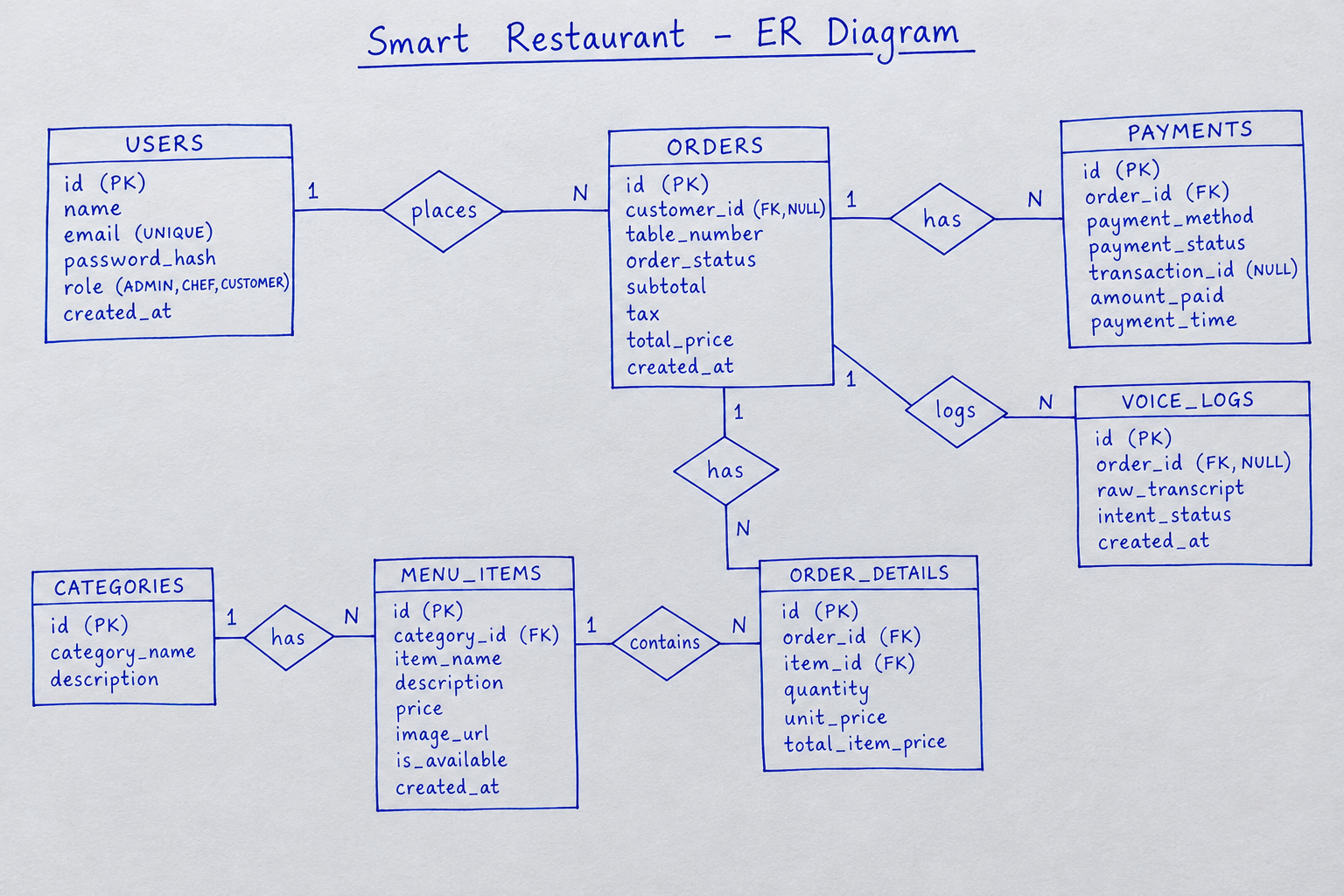
📐 Entity-Relationship (ER) Diagram
Visual representation of Primary/Foreign Keys, cardinalities, and relational constraints across all 7 Smart Restaurant entities.
4. Key Features & Business Logic
The system executes intelligent backend workflows to process real-time voice orders, dynamic billing calculations, kitchen dispatching, and secure hybrid payments while maintaining strict data isolation across customer, kitchen, and administrative roles.
AI Voice Intent Processing & Mapping
Captures natural speech at table kiosks or mobile browsers, converts audio to text, and parses food intents and quantities using fuzzy matching. Matches menu items against active database listings while recording execution logs in voice_logs for accuracy auditing.
Dynamic Calculation & Tax Engine
Calculates subtotal, applies configurable tax rates, and generates grand totals dynamically per order. To preserve historical financial integrity against menu price changes, unit prices are frozen at the exact time of order placement into order_details.
Real-Time Kitchen Pipeline (KDS)
Dispatches newly confirmed orders instantly to chef screens. Enforces a finite state machine for order lifecycle transitions:PENDING ➔ COOKING ➔ READY ➔ COMPLETED.
Hybrid Cash & Online Settlement
Supports both contactless online payments (bKash, Cards, Stripe) with unique transaction verification and traditional cash settlements verified at counter terminals, ensuring uninterrupted service for all customer types.
🔑 Role-Based Access Control (RBAC) Matrix
| System Action / Module | Admin / Manager | Chef / Kitchen Staff | Customer / Guest |
|---|---|---|---|
| Voice & Interactive Menu Ordering | Full Access | ✗ Disabled | ✓ Place & Modify Orders |
| Menu & Price Management | ✓ Add / Edit / Delete Items | Toggle Item Availability | ✗ Read Only |
| Kitchen Display & Order Pipeline | Monitor All Orders | ✓ Update Status (Cooking/Ready) | View Own Live Order Status |
| Payment Verification & Cashiering | ✓ Full Settlement & Reports | ✗ Restricted | Initiate Payment (Online/Cash) |
| Voice Recognition Logs & Audits | ✓ Full Inspection & Analytics | ✗ Restricted | ✗ Restricted |
🌐 REST API Endpoints Architecture
| HTTP Method | Endpoint Path | Access Level | Business Logic Description |
|---|---|---|---|
| POST | /api/v1/auth/login | Public | Authenticates credentials and returns signed JWT token with role claims. |
| GET | /api/v1/menu/items | Public | Fetches active menu catalog grouped by categories with price and image metadata. |
| POST | /api/v1/voice/process | Public / Customer | Parses transcript audio/text into structured order items and logs intent status. |
| POST | /api/v1/orders/create | Customer / Kiosk | Creates order header, inserts itemized line records, and sets status to PENDING. |
| PATCH | /api/v1/orders/:id/status | Chef / Admin | Updates order lifecycle state (COOKING, READY, COMPLETED) for kitchen workflow. |
| POST | /api/v1/payments/process | Customer / Cashier | Executes online gateway webhook or settles cash order with transaction confirmation. |
5. Core SQL Queries & Backend API Logic
Production-ready Next.js App Router API handlers and relational MySQL transactional logic powering kiosk voice welcome initialization, atomic order processing, KDS FIFO queuing, and multi-channel payment reconciliation.
01. Kiosk Session Initialization & Welcome Audio Payload (Next.js)
Fetches active categories and menu items from MySQL and generates dynamic Text-to-Speech (TTS) greeting text for table kiosks:
// app/api/v1/kiosk/init/[tableNumber]/route.js
import { NextResponse } from 'next/server';
import pool from '@/lib/db';

export async function GET(req, { params }) {
  try {
    const { tableNumber } = await params;

    // 1. Fetch available menu items grouped by categories
    const [rows] = await pool.query(`
      SELECT c.category_name, m.id, m.item_name, m.price, m.description
      FROM categories c
      JOIN menu_items m ON c.id = m.category_id
      WHERE m.is_available = TRUE
      ORDER BY c.id ASC
    `);

    const welcomeSpeech = `Welcome to Smart Restaurant at Table ${tableNumber}! I am your AI Voice Assistant. What would you like to order today?`;

    return NextResponse.json({
      table_number: tableNumber,
      tts_welcome_audio_text: welcomeSpeech,
      menu_catalog: rows
    });
  } catch (error) {
    return NextResponse.json({ error: "Failed to initialize kiosk" }, { status: 500 });
  }
}
02. Voice Intent Parsing, Tax Engine & MySQL Transaction
Parses transcript, matches requested food items, executes MySQL atomic transaction across orders and order_details, and saves operational logs into voice_logs:
// app/api/v1/voice/process-and-order/route.js
import { NextResponse } from 'next/server';
import pool from '@/lib/db';

export async function POST(req) {
  const connection = await pool.getConnection();
  try {
    const { table_number, raw_transcript, customer_id, parsed_items } = await req.json();

    if (!parsed_items || !Array.isArray(parsed_items) || parsed_items.length === 0) {
      await connection.query('INSERT INTO voice_logs (raw_transcript, intent_status) VALUES (?, ?)',
        [raw_transcript || '', 'UNRECOGNIZED_SPEECH']);
      return NextResponse.json({
        status: "FAILED",
        voice_response: "I couldn't understand your order. Please try again."
      }, { status: 400 });
    }

    await connection.beginTransaction();

    let subtotal = 0;
    const itemsToInsert = [];

    // Historical price freezing & verification
    for (const item of parsed_items) {
      const [dbItems] = await connection.query(
        'SELECT id, item_name, price FROM menu_items WHERE item_name LIKE ? AND is_available = TRUE LIMIT 1',
        [`%${item.item_name}%`]
      );

      if (dbItems.length > 0) {
        const menuItem = dbItems[0];
        const lineTotal = Number(menuItem.price) * (item.qty || 1);
        subtotal += lineTotal;
        itemsToInsert.push({
          id: menuItem.id,
          name: menuItem.item_name,
          qty: item.qty || 1,
          unit_price: menuItem.price,
          lineTotal
        });
      }
    }

    // Safety Check: Avoid creating zero-amount empty orders
    if (itemsToInsert.length === 0) {
      await connection.rollback();
      await pool.query('INSERT INTO voice_logs (raw_transcript, intent_status) VALUES (?, ?)',
        [raw_transcript, 'ITEM_NOT_FOUND']);
      return NextResponse.json({
        status: "FAILED",
        voice_response: "Sorry, the items you requested are currently not on our menu."
      }, { status: 404 });
    }

    const tax = Number((subtotal * 0.05).toFixed(2));
    const totalPrice = Number((subtotal + tax).toFixed(2));

    // Create Order Header
    const [orderResult] = await connection.query(
      'INSERT INTO orders (customer_id, table_number, order_status, subtotal, tax, total_price) VALUES (?, ?, ?, ?, ?, ?)',
      [customer_id || null, table_number, 'PENDING', subtotal, tax, totalPrice]
    );
    const orderId = orderResult.insertId;

    // Insert Order Line Items
    for (const line of itemsToInsert) {
      await connection.query(
        'INSERT INTO order_details (order_id, item_id, quantity, unit_price, total_item_price) VALUES (?, ?, ?, ?, ?)',
        [orderId, line.id, line.qty, line.unit_price, line.lineTotal]
      );
    }

    // Write Voice Log
    await connection.query(
      'INSERT INTO voice_logs (order_id, raw_transcript, intent_status) VALUES (?, ?, ?)',
      [orderId, raw_transcript, 'SUCCESS']
    );

    await connection.commit();

    const confirmSpeech = `Your order for ${itemsToInsert.map(i => `${i.qty} ${i.name}`).join(', ')} has been placed! Total amount is ${totalPrice} Taka. Sent to kitchen.`;

    return NextResponse.json({ order_id: orderId, status: "CONFIRMED", total_price: totalPrice, tts_confirmation_text: confirmSpeech });
  } catch (error) {
    await connection.rollback();
    return NextResponse.json({ error: "Transaction failed: " + error.message }, { status: 500 });
  } finally {
    connection.release();
  }
}
03. Chef KDS Queue SQL Query (FIFO Serial Processing)
Fetches incoming live orders ordered chronologically (ASC) so the kitchen team processes older orders first:
SELECT
    o.id AS order_id,
    o.table_number,
    o.order_status,
    o.created_at AS order_time,
    m.item_name,
    od.quantity
FROM orders o
JOIN order_details od ON o.id = od.order_id
JOIN menu_items m ON od.item_id = m.id
WHERE o.order_status IN ('PENDING', 'COOKING')
ORDER BY o.created_at ASC; -- FIFO Order Processing
04. Kitchen Status Transition & Kiosk Audio Alert Dispatch
Updates order state on chef action and returns audio text for the target customer kiosk when the order reaches READY status:
// app/api/v1/orders/[id]/status/route.js
import { NextResponse } from 'next/server';
import pool from '@/lib/db';

export async function PATCH(req, { params }) {
  try {
    const { id: orderId } = await params;
    const { status } = await req.json(); // 'COOKING' | 'READY' | 'COMPLETED'

    const [rows] = await pool.query('SELECT table_number FROM orders WHERE id = ?', [orderId]);
    if (rows.length === 0) {
      return NextResponse.json({ error: "Order not found" }, { status: 404 });
    }

    await pool.query('UPDATE orders SET order_status = ? WHERE id = ?', [status, orderId]);

    let alertText = "";
    if (status === "READY") {
      alertText = `Attention Table ${rows[0].table_number}! Order Number ${orderId} is ready to be served.`;
    }

    return NextResponse.json({ order_id: Number(orderId), updated_status: status, customer_voice_alert: alertText });
  } catch (error) {
    return NextResponse.json({ error: "Failed to update order status" }, { status: 500 });
  }
}
05. Hybrid Payment Settlement & Order Completion Logic
Executes cash or gateway payment reconciliation, updates payments, and sets order status to COMPLETED:
// app/api/v1/payments/process/route.js
import { NextResponse } from 'next/server';
import pool from '@/lib/db';

export async function POST(req) {
  const connection = await pool.getConnection();
  try {
    const { order_id, payment_method, transaction_id } = await req.json();

    const [orders] = await connection.query('SELECT total_price FROM orders WHERE id = ?', [order_id]);
    if (orders.length === 0) {
      return NextResponse.json({ error: "Order not found" }, { status: 404 });
    }

    const amountPaid = orders[0].total_price;

    await connection.beginTransaction();

    // 1. Record payment transaction
    await connection.query(
      'INSERT INTO payments (order_id, payment_method, payment_status, transaction_id, amount_paid) VALUES (?, ?, ?, ?, ?)',
      [order_id, payment_method, 'COMPLETED', transaction_id || null, amountPaid]
    );

    // 2. Finalize order lifecycle
    await connection.query('UPDATE orders SET order_status = ? WHERE id = ?', ['COMPLETED', order_id]);

    await connection.commit();

    return NextResponse.json({
      status: "SUCCESS",
      message: `Payment of ${amountPaid} Taka finalized successfully.`
    });
  } catch (error) {
    await connection.rollback();
    return NextResponse.json({ error: "Payment processing failed" }, { status: 500 });
  } finally {
    connection.release();
  }
}
06. Client-Side Voice Engine (STT & TTS Integration)
Frontend Next.js client component handles Speech-to-Text (STT) voice recognition and Text-to-Speech (TTS) audio feedback via native Web Speech API:
// components/VoiceOrderKiosk.jsx
'use client';
import { useState } from 'react';

export default function VoiceOrderKiosk({ tableNumber }) {
  const [transcript, setTranscript] = useState('');
  const [isListening, setIsListening] = useState(false);
  const [responseMsg, setResponseMsg] = useState('');

  // 1. Text-to-Speech (TTS) Function
  const speak = (text) => {
    if ('speechSynthesis' in window) {
      window.speechSynthesis.cancel(); // Clear previous speech queue
      const utterance = new SpeechSynthesisUtterance(text);
      utterance.lang = 'en-US';
      utterance.rate = 0.95;
      window.speechSynthesis.speak(utterance);
    }
  };

  // 2. Speech-to-Text (STT) Recognition
  const startListening = () => {
    const SpeechRecognition = window.SpeechRecognition || window.webkitSpeechRecognition;
    if (!SpeechRecognition) {
      alert('Browser does not support Speech Recognition.');
      return;
    }

    const recognition = new SpeechRecognition();
    recognition.lang = 'en-US';
    recognition.continuous = false;
    recognition.interimResults = false;

    recognition.onstart = () => setIsListening(true);
    recognition.onend = () => setIsListening(false);

    recognition.onresult = async (event) => {
      const userVoiceInput = event.results[0][0].transcript;
      setTranscript(userVoiceInput);

      // 3. Send captured transcript to Backend API
      const res = await fetch('/api/v1/voice/process-and-order', {
        method: 'POST',
        headers: { 'Content-Type': 'application/json' },
        body: JSON.stringify({
          table_number: tableNumber,
          raw_transcript: userVoiceInput,
          parsed_items: [{ item_name: userVoiceInput, qty: 1 }] // Simplified payload
        })
      });

      const data = await res.json();
      if (data.status === 'CONFIRMED') {
        setResponseMsg(data.tts_confirmation_text);
        speak(data.tts_confirmation_text); // Trigger AI Voice Response
      } else {
        const errorSpeech = "Please say again, I do not understand.";
        setResponseMsg(errorSpeech);
        speak(errorSpeech);
      }
    };

    recognition.start();
  };

  return (
    <div className="p-4 border rounded-xl bg-white space-y-4">
      <button
        onClick={startListening}
        className={`px-4 py-2 rounded-lg font-bold ${isListening ? 'bg-red-500 text-white animate-pulse' : 'bg-blue-600 text-white'}`}
      >
        {isListening ? 'Listening...' : 'Push to Speak'}
      </button>
      <p className="text-sm"><strong>Your Voice:</strong> {transcript}</p>
      <p className="text-sm"><strong>AI Response:</strong> {responseMsg}</p>
    </div>
  );
}
07. Real-Time KDS SSE Stream (Server-Sent Events)
Streams instant order updates directly to the kitchen display screen without requiring client page polling or page refreshes:
// app/api/v1/kds/stream/route.js
import { NextResponse } from 'next/server';
import pool from '@/lib/db';

export async function GET(req) {
  const encoder = new TextEncoder();

  const customReadable = new ReadableStream({
    start(controller) {
      // 1. Send initial connection ACK
      controller.enqueue(encoder.encode(`data: ${JSON.stringify({ message: "KDS Stream Connected" })}\n\n`));

      // 2. Periodically push live pending orders to kitchen display every 3 seconds
      const interval = setInterval(async () => {
        try {
          const [liveOrders] = await pool.query(`
            SELECT
                o.id AS order_id,
                o.table_number,
                o.order_status,
                o.created_at AS order_time,
                m.item_name,
                od.quantity
            FROM orders o
            JOIN order_details od ON o.id = od.order_id
            JOIN menu_items m ON od.item_id = m.id
            WHERE o.order_status IN ('PENDING', 'COOKING')
            ORDER BY o.created_at ASC
          `);

          controller.enqueue(encoder.encode(`data: ${JSON.stringify(liveOrders)}\n\n`));
        } catch (err) {
          console.error("KDS Stream DB Error:", err);
        }
      }, 3000);

      req.signal.addEventListener('abort', () => {
        clearInterval(interval);
        controller.close();
      });
    }
  });

  return new NextResponse(customReadable, {
    headers: {
      'Content-Type': 'text/event-stream',
      'Cache-Control': 'no-cache, no-transform',
      'Connection': 'keep-alive',
    },
  });
}
Thank You 💐