ClassTracker – Student Attendance & Result System
Relational 3NF DBMS for managing class attendance, grade calculations, lecture materials, and privacy-focused student marksheets.
1. Introduction & System Overview
ClassTracker is a full-stack Database Management System (DBMS) designed to digitize classroom operations for teachers and students. It replaces messy paper registers and spreadsheets with a centralized, role-based web platform.
👨🏫 For Teachers
- Upload lecture materials (PDF, DOC) & course announcements.
- Mark daily student attendance (Present/Absent).
- Input exam marks (CT-1 to CT-4, Mid, Final) with auto-grade logic.
👨🎓 For Students
- View and download course materials and notices instantly.
- Check personal attendance percentages in real-time.
- Access individual marksheet privately (protected from peers).
Core Objective
Build a 3NF normalized MySQL database with FastAPI and Next.js (JavaScript) that automates multi-assessment grade calculations (including best 3 out of 4 Class Tests) while ensuring privacy-isolated data access for students.
2. System Architecture & Data Flow
ClassTracker operates on a classic 3-Tier client-server architecture. The frontend handles the user interface, the backend manages business logic and security protocols, and the database stores all application records under strict Third Normal Form (3NF) principles.
🏗️ System Layers Breakdown
Next.js (JS) + Tailwind CSS
Provides responsive dashboards for teachers and students, communicating seamlessly with the FastAPI backend through RESTful API endpoints.
Python FastAPI
Executes core business logic—handling JWT authentication, file upload pipelines, and dynamic grade algorithms like "Best 3 out of 4 Class Tests."
MySQL (Relational 3NF)
Stores normalized relational datasets for students, courses, attendance, and exam evaluations without data redundancy.
🔄 Step-by-Step Data Flow
- Authentication: Users (Teachers or Students) log in, and the FastAPI backend issues a secure JWT bearer token for role validation.
- Teacher Data Upload: Instructors upload lecture PDFs or enter assessment scores. FastAPI validates the payload and writes it directly to MySQL.
- Automated Processing: Once scores are saved, backend SQL aggregation queries automatically calculate total percentages and letter grades.
- Privacy-Isolated Fetch: When a student opens their dashboard, the backend filters queries exclusively by their authenticated
student_id, guaranteeing peer-level data privacy.
3. Database Schema & 3NF Normalization
To eliminate data redundancy and prevent insertion, update, or deletion anomalies, the database schema is strictly normalized up to Third Normal Form (3NF).
🗄️ Relational Tables Overview
1. users
Stores authentication credentials, personal info, and role flags (TEACHER vs STUDENT).
2. courses
Contains course metadata mapped to a primary instructor via teacher_id.
3. course_enrollments
Junction table resolving the Many-to-Many (N:M) relationship between students and courses.
4. attendance
Tracks daily status (PRESENT / ABSENT) per student per course per date.
5. marks
Records individual exam scores (CT_1 to CT_4, MID, FINAL, ASSIGNMENT).
6. course_materials
Stores lecture materials, PDF documents, and external links uploaded by course instructors.
7. announcements
Stores official course notices and updates broadcasted by teachers to enrolled students.
📊 Database Schema Constraints (SQL Field Level)
- id (INT, PK, Auto Increment)
- name (VARCHAR 100, NOT NULL)
- email (VARCHAR 100, UNIQUE, NOT NULL)
- password_hash (VARCHAR 255, NOT NULL)
- role (ENUM: 'TEACHER', 'STUDENT')
- student_id (VARCHAR 50, UNIQUE, NULL)
- id (INT, PK, Auto Increment)
- course_code (VARCHAR 20, NOT NULL)
- course_name (VARCHAR 100, NOT NULL)
- description (TEXT, NULL)
- teacher_id (INT, FK -> users.id)
- id (INT, PK, Auto Increment)
- student_id (INT, FK -> users.id)
- course_id (INT, FK -> courses.id)
- id (INT, PK, Auto Increment)
- course_id (INT, FK -> courses.id)
- student_id (INT, FK -> users.id)
- date (DATE, NOT NULL)
- status (ENUM: 'PRESENT', 'ABSENT')
- id (INT, PK, Auto Increment)
- course_id (INT, FK -> courses.id)
- student_id (INT, FK -> users.id)
- exam_type (ENUM: 'CT_1'...'FINAL')
- marks_obtained (FLOAT, NOT NULL)
- total_marks (FLOAT, NOT NULL)
- UNIQUE KEY (course_id, student_id, exam_type)
- id (INT, PK, Auto Increment)
- course_id (INT, FK -> courses.id)
- title (VARCHAR 150, NOT NULL)
- file_url (TEXT, NOT NULL)
- created_at (TIMESTAMP, DEFAULT CURRENT_TIMESTAMP)
- id (INT, PK, Auto Increment)
- course_id (INT, FK -> courses.id)
- title (VARCHAR 150, NOT NULL)
- content (TEXT, NOT NULL)
- created_at (TIMESTAMP, DEFAULT CURRENT_TIMESTAMP)
💡 How 3NF is Maintained
- 1NF: All column values are atomic (e.g., individual marks and attendance dates are stored in separate rows, not comma-separated lists).
- 2NF: All non-key attributes are fully dependent on the primary key, removing partial dependencies through junction tables like
course_enrollments. - 3NF: Calculated fields like Attendance Percentage and Best 3 out of 4 CT Totals are computed dynamically via SQL queries rather than stored statically, eliminating transitive dependencies.
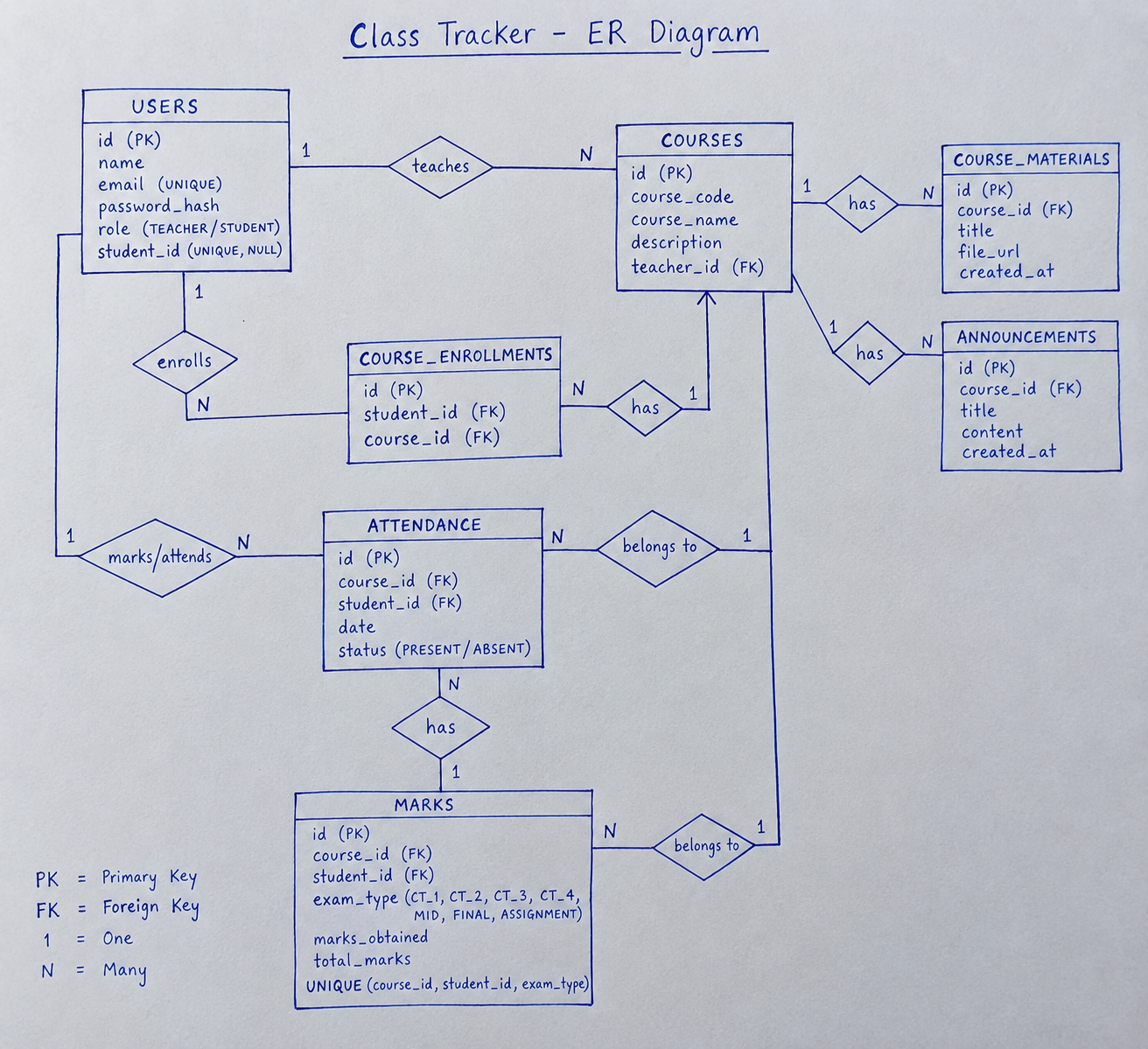
📐 Entity-Relationship (ER) Diagram
Visual representation of Primary/Foreign Keys, 1:N cardinalities, and relational constraints across all 7 entities.
4. Key Features & Business Logic
The application executes specific business rules at the backend level to automate academic record management, calculate student progress dynamically, and enforce data privacy.
Best 3 out of 4 CT Calculation
Instead of averaging all Class Tests, the FastAPI backend fetches all 4 CT marks for a student, sorts them in descending order, drops the lowest score, and sums the top 3 scores dynamically.
Attendance Percentage Engine
Attendance is tracked per lecture date as PRESENT or ABSENT. The system computes real-time percentages using:
Privacy-Isolated Marksheets
To prevent peer grading exposure, the API enforces Row-Level Security via JWT identity verification. Query parameters strictly restrict fetches to WHERE student_id = logged_in_user.
Course Resource Delivery
Instructors can stream announcements and upload lecture materials (PDF, DOCX) through FastAPI multipart form endpoints. Static metadata is logged in MySQL for one-click student downloads.
🔑 Role-Based Access Matrix
| Action / Feature | Teacher Role | Student Role |
|---|---|---|
| Upload Course PDF / Doc | ✓ Allowed (Full Access) | ✗ Read/Download Only |
| Attendance Input | ✓ Batch Entry (All Students) | View Personal % Only |
| Exam Marks Entry | ✓ Input & Update (CT/Mid/Final) | View Personal Marksheet Only |
| Course Notice Board | ✓ Create & Broadcast | View Active Notices |
🌐 REST API Endpoints Blueprint
| Method | Endpoint Path | Role Required | Description |
|---|---|---|---|
| POST | /api/v1/auth/login | Public | Authenticates user & returns JWT Token. |
| POST | /api/v1/attendance/batch | Teacher | Batch inserts daily attendance for a course. |
| GET | /api/v1/student/marksheet | Student | Fetches JWT-protected personal marks & CT sum. |
| POST | /api/v1/materials/upload | Teacher | Uploads lecture files & logs metadata in MySQL. |
5. Core SQL Queries & Backend API Logic
Production-level code snippets demonstrating core academic calculations (Best 3 CTs out of 20, Attendance Marks out of 5) and security implementations matching the ClassTracker schema.
01. Password Hashing & JWT Token Generation (FastAPI)
Hashes user passwords using passlib (bcrypt) before saving to the users table and generates role-based JWT access tokens:
from passlib.context import CryptContext
        from datetime import datetime, timedelta
        import jwt

        pwd_context = CryptContext(schemes=["bcrypt"], deprecated="auto")
        SECRET_KEY = "YOUR_SUPER_SECRET_JWT_KEY"
        ALGORITHM = "HS256"

        # 1. Password Hashing Utility
        def hash_password(password: str) -> str:
            return pwd_context.hash(password)

        def verify_password(plain_password: str, hashed_password: str) -> bool:
            return pwd_context.verify(plain_password, hashed_password)

        # 2. JWT Access Token Generator
        def create_access_token(data: dict, expires_delta: timedelta = timedelta(hours=8)):
            to_encode = data.copy()
            expire = datetime.utcnow() + expires_delta
            to_encode.update({"exp": expire})
            return jwt.encode(to_encode, SECRET_KEY, algorithm=ALGORITHM)
02. Dynamic Evaluation: Best 3 out of 4 CTs (Scaled to 20)
Fetches CT scores from marks, sorts them, sums the top 3, and converts the total to a standard score out of 20:
@app.get("/api/v1/student/{student_id}/ct-evaluation")
        def calculate_best_3_ct(student_id: int, course_id: int, db: Session = Depends(get_db)):
            # Fetch CT records (CT_1, CT_2, CT_3, CT_4) from 'marks' table
            ct_records = db.query(Marks.marks_obtained, Marks.total_marks).filter(
                Marks.student_id == student_id,
                Marks.course_id == course_id,
                Marks.exam_type.in_(["CT_1", "CT_2", "CT_3", "CT_4"])
            ).all()

            if not ct_records:
                return {"best_3_raw_sum": 0, "converted_ct_score_out_of_20": 0}

            # Normalize each CT to a percentage score and get obtained values
            obtained_scores = [r.marks_obtained for r in ct_records]

            # Sort in descending order to pick the highest 3
            obtained_scores.sort(reverse=True)
            best_3_scores = obtained_scores[:3]
            best_3_raw_sum = sum(best_3_scores)

            # Assuming each CT total is 20 (Best 3 total = 60). Convert 60 -> 20 marks:
            converted_score_out_of_20 = round((best_3_raw_sum / 60.0) * 20.0, 2)

            return {
                "all_ct_scores": obtained_scores,
                "best_3_scores": best_3_scores,
                "best_3_raw_sum": best_3_raw_sum,
                "ct_score_out_of_20": converted_score_out_of_20
            }
03. SQL Query: Attendance Percentage & Score (Out of 5)
Aggregates attendance records and dynamically assigns attendance marks (out of 5) based on percentage slabs:
SELECT
            student_id,
            COUNT(*) AS total_held_classes,
            SUM(CASE WHEN status = 'PRESENT' THEN 1 ELSE 0 END) AS total_present,
            ROUND((SUM(CASE WHEN status = 'PRESENT' THEN 1 ELSE 0 END) * 100.0 / COUNT(*)), 2) AS attendance_percentage,

            -- Dynamic Grading Logic for Attendance Marks (Out of 5)
            CASE
                WHEN (SUM(CASE WHEN status = 'PRESENT' THEN 1 ELSE 0 END) * 100.0 / COUNT(*)) >= 90 THEN 5.0
                WHEN (SUM(CASE WHEN status = 'PRESENT' THEN 1 ELSE 0 END) * 100.0 / COUNT(*)) >= 85 THEN 4.0
                WHEN (SUM(CASE WHEN status = 'PRESENT' THEN 1 ELSE 0 END) * 100.0 / COUNT(*)) >= 80 THEN 3.0
                WHEN (SUM(CASE WHEN status = 'PRESENT' THEN 1 ELSE 0 END) * 100.0 / COUNT(*)) >= 75 THEN 2.0
                WHEN (SUM(CASE WHEN status = 'PRESENT' THEN 1 ELSE 0 END) * 100.0 / COUNT(*)) >= 70 THEN 1.0
                ELSE 0.0
            END AS attendance_marks_out_of_5
        FROM attendance
        WHERE course_id = 101 AND student_id = 45
        GROUP BY student_id;
Thank You 💐